
TKASH Makes International Remittance Simple and Accessible
Table Of Content
- Overview of Remittance Services
- Supported Currencies and Destinations
- How Remittance Works
- Exchange Rates and Currency Conversion
- Remittance Features
- Supported Receiving Countries
- Helpful Resources
- Frequently Asked Questions
Overview of Remittance Services
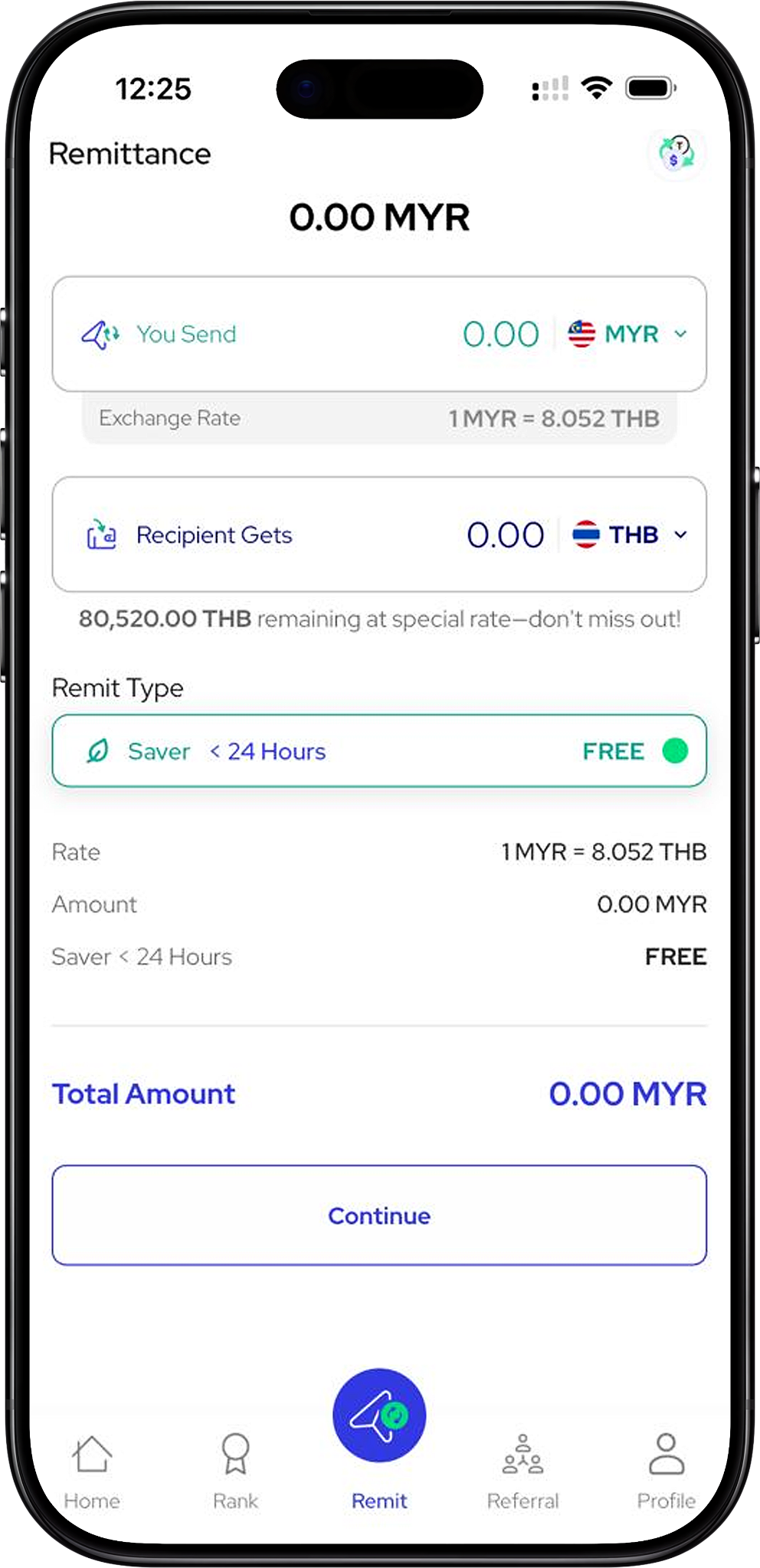
Send Funds with Transparent Exchange Information
TKASH provides a remittance service that enables members to send funds using supported currencies while viewing exchange rates, recipient amounts and transfer details before submission. The remittance interface is designed to help users understand transfer information clearly before proceeding.
Members can review wallet balances, sending currencies, recipient currencies, transfer amounts and remittance processing options from a single page.
Supported Currencies and Destinations
Multiple Currency Options for Flexible Transfers
Based on the available remittance interface, members may choose from supported sending currencies such as MYR and USDT before selecting a destination currency. Available currency options may vary depending on market availability and service support.
TKASH supports currency selection features that help members compare exchange values before completing a transfer.
How Remittance Works
Step-by-Step Remittance Process
Step 1: Select a Currency (Anchor Link: #select-currency) and choose the preferred sending currency from the available options.
Step 2: Enter Transfer Amount (Anchor Link: #enter-amount) and review the estimated recipient amount based on the displayed exchange rate.
Step 3: Choose a Remit Type (Anchor Link: #remit-type) and review available processing durations and applicable fees.
Step 4: Review Exchange Information (Anchor Link: #exchange-rate) to verify the current conversion rate before continuing.
Step 5: Confirm Transfer Details (Anchor Link: #confirm-transfer) and proceed with the recipient information submission process.
Members who need a detailed walkthrough can visit Remittance Tutorial (Internal Link: /en/tutorial/remittance-tutorial - Tutorial Page).
Exchange Rates and Currency Conversion
View Real-Time Conversion Information
TKASH displays exchange rate information directly within the remittance interface, allowing members to estimate recipient amounts before initiating a transfer.
Available examples shown within the remittance system include currency conversion options involving Thailand (THB), Vietnam (VND), Indonesia (IDR), Bangladesh (BDT), China (CNY), India (INR), Myanmar (MMK), Nepal (NPR), Philippines (PHP), Pakistan (PKR) and Singapore (SGD).
Exchange rates may change based on market conditions and service availability. Members should always review the displayed rate before confirming a transfer.
Remittance Features
Designed for Convenience and Clarity
TKASH helps members review key transaction details before submission, including exchange rates, transfer amounts, receiving amounts and processing options.
Features available within the remittance section include currency selection, exchange rate viewing, amount calculation, recipient amount estimation and transaction summary review.
Members can also access Top Up (Internal Link: /en/top-up - Feature Page), Withdrawal (Internal Link: /en/withdrawal - Feature Page) and Rebates (Internal Link: /en/rebates - Feature Page) to manage related account activities.
Supported Receiving Countries
International Transfer Coverage
Available destination currency options shown within the remittance service include Thailand, Vietnam, Indonesia, Bangladesh, China, India, Myanmar, Nepal, Philippines, Pakistan and Singapore. Additional destinations may be introduced depending on service updates.
Members should review available destination currencies directly within the remittance section before initiating a transaction.
Helpful Resources
Learn More About Platform Features
Explore Home (Internal Link: /en - Main Page), Download (Internal Link: /en/download - Download Page), Register (Internal Link: /en/register - Registration Page), Login (Internal Link: /en/login - Login Page), Tutorial (Internal Link: /en/tutorial - Tutorial Hub), Referral Tutorial (Internal Link: /en/tutorial/referral-tutorial - Tutorial Page), VIP Tutorial (Internal Link: /en/tutorial/vip-tutorial - Tutorial Page), Rank (VIP) (Internal Link: /en/rank - VIP Page), Agent (Internal Link: /en/agent - Agent Page) and Terms & Conditions (Internal Link: /en/terms-conditions - Legal Page).
Official website: https://tkashofficial.com
Frequently Asked Questions
What Currencies Can Be Used for Remittance?
Available sending and receiving currencies depend on the options currently displayed within the remittance interface and may change over time.
How Can I Check Exchange Rates?
Exchange rate information is displayed within the remittance page before a transfer is submitted. Members can review conversion values prior to confirmation.
Where Can I Learn the Transfer Process?
Members can access the dedicated Remittance Tutorial (Internal Link: /en/tutorial/remittance-tutorial - Tutorial Page) for a complete step-by-step guide.
Start Your Remittance Journey with Confidence
Explore available currencies, review exchange rates and understand the transfer process through TKASH remittance resources designed to help members make informed decisions.